Tech all rounder

Huawei MatePad Pro Max Launch: Premium Display, Powerful Performance & Flagship Features

Huawei MatePad Pro Max premium tablet with flagship display and powerful performance

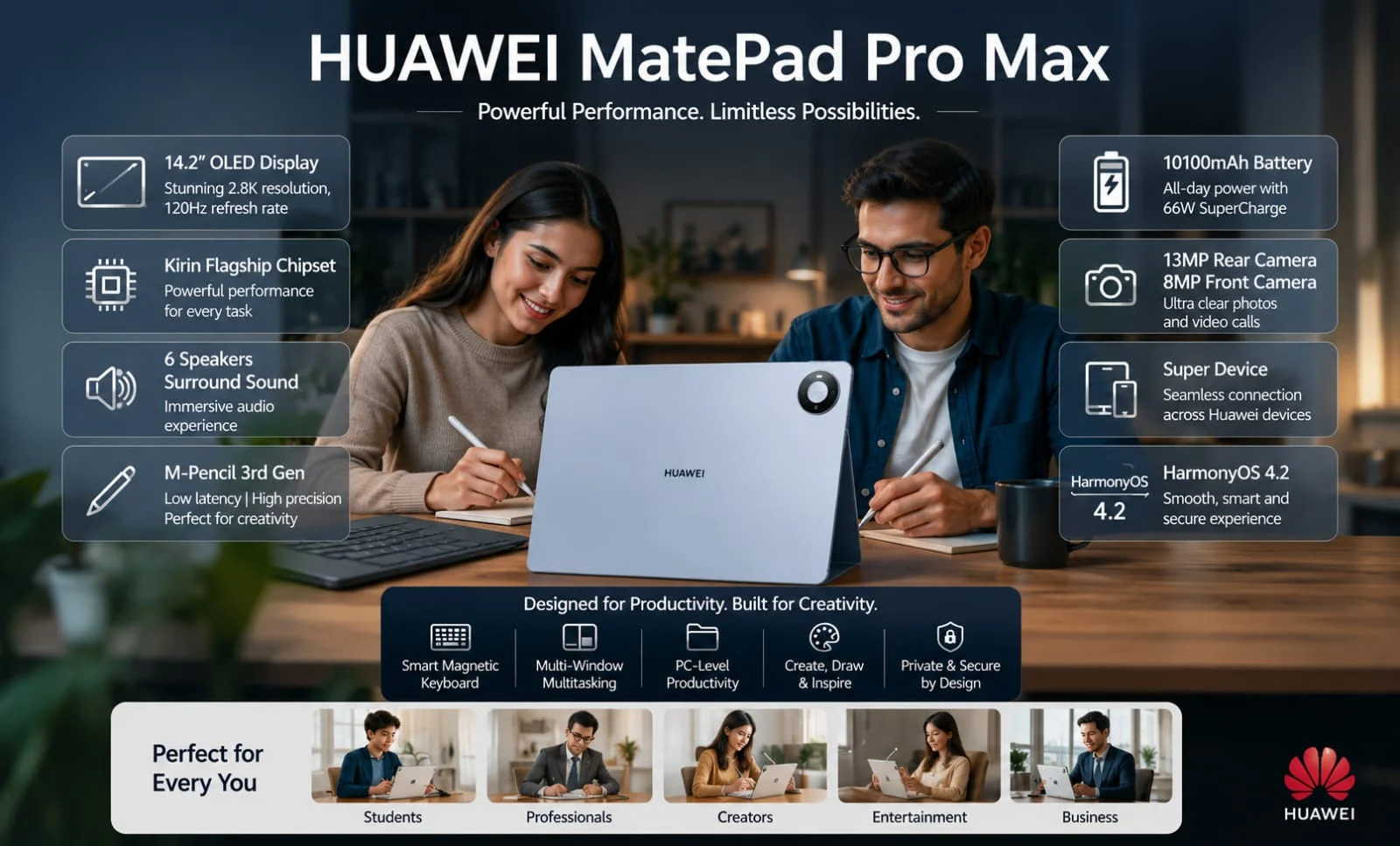
Wow, friend, Huawei has made a huge splash in May 2026! The Huawei MatePad Pro Max has been launched, and to be honest, seeing it for the first time, it felt like the real premium segment of tablets has heated up. They are calling it the world’s thinnest flagship tablet – 4.7mm thin, 13.2-inch stunning OLED PaperMatte display, and performance that can easily handle heavy work. If you are searching for Huawei MatePad Pro Max tablet” or “Huawei OLED tablet, then this article is absolutely useful for you. I am giving a complete breakdown here – design, Huawei MatePad Pro Max specs, features, battery life, price, and real-life use. Talking like an experienced blogger, as if sipping coffee. Let’s go into detail. Highlight key Ultra Slim: 4.7mm thick (world’s thinnest flagship tablet) Display: 13.2″ OLED PaperMatte, 3K, 144Hz, 1600 nits, anti-glare Performance: Kirin flagship chip + 12GB RAM Battery: 10,400mAh, up to 14.5 hrs + 66W fast charging Stylus: Excellent paper-like drawing & note support Audio: 6-speaker setup Price: Starts approx ₹1.15 lakh (expected) Huawei MatePad Pro Max Launch: New Huawei Tablet Launch in 2026 The Huawei tablet launch in 2026 has come out very solid. The MatePad series has now been made even more premium by giving it the name Pro Max. This is a global launch, showcased at the Bangkok event. Seeing people’s reactions, it seems that the iPad Pro now has a solid competitor. In the Huawei flagship tablet category, this can reach the top because there are new things in both design and display. Thin body, paper-like feel, and powerful hardware – everything together. If you are looking for a productivity tablet that does drawing, notes, movies, and multitasking, then definitely include this in the list. Huawei MatePad Pro Max Price and Availability Huawei MatePad Pro Max price starts globally at €1399 (around ₹1.15 lakh to ₹1.55 lakh in Indian currency depending on variant and bundle). Variants: 12GB + 256GB + Cover ≈ €1399 12GB + 256GB + Keyboard ≈ €1499 12GB + 512GB + Keyboard ≈ €1649 In India, the expected price for the base variant could be around ₹1.15 lakh, exact launch and pricing will be announced soon. According to 2026 standards, this is a strong entry in the premium segment for Huawei tablets. If you take the keyboard and stylus bundle, productivity doubles. Huawei MatePad Pro Max: Specifications Category Details Build Quality 4.7mm Body Full Metal Unibody Design Weight 499g (Standard), 509g (PaperMatte Edition) Display Size 13.2-inch Flexible OLED PaperMatte, 144Hz Peak Brightness Up to 1600 nits Rear Camera 50MP True-to-Colour Camera Front Camera 12MP Selfie Camera Special Features PaperMatte Anti-Glare Display, PC-like Desktop Mode Processor Kirin 9-Series Flagship Chipset Stylus Support HUAWEI M-Pencil Pro, HarmonyOS 4.3 Battery 10,400mAh (Global) / 9,760mAh EU Battery Variant Fast Charging 66W Fast Charging / 40W Reverse Charging Battery Backup Up to 14.5 Hours Video Playback RAM/Storage 12GB RAM + 256GB / 512GB Gaming Performance Smooth High-End Gaming Support Cooling System Improved Cooling Technology Price (India) Starting Around ₹1.15 Lakh Also Read: Huawei MatePad 11.5 Review: Best Budget Tablet 2026?   Huawei MatePad Pro Max Display: 13.2-Inch Flexible OLED PaperMatte Magic Display & Build Quality Now talking about the real hero – the display. The most amazing thing in Huawei MatePad Pro Max specs is this 13.2-inch Flexible OLED PaperMatte Display. Resolution: 3000 x 2000 (3K) Refresh Rate: 144Hz Peak Brightness: 1600 nits Contrast Ratio: 2,000,000:1 PWM Dimming: 1440Hz PaperMatte technology reduces glare to almost zero. Comfortable reading and drawing even in sunlight. Using a stylus feels like real paper – that’s why it’s a dream come true for artists and students.  Colors pop while watching movies, blacks are deep, and the smoothness is buttery. I thought that if I binge-watch a series on this, my eyes wouldn’t get tired either. In the Huawei OLED tablet category, this is currently one of the best options, especially in terms of anti-glare. Design and Build Quality: The World’s Thinnest Flagship Tablet Bro, you’ll be impressed just by looking at the design. The Huawei MatePad Pro Max is only 4.7mm thick. Yes, so thin with a 13.2-inch screen! The weight of the standard version is around 499g, and the PaperMatte edition is a bit more, 509g. As soon as you hold it in your hand, it feels like a premium notebook, not a heavy, bulky tablet. It has a full metal unibody build, with bezels of only 3.55mm – the screen-to-body ratio goes up to 94%. The colors available are Blue and Space Gray. I am totally impressed with the Space Gray one; it seems perfect for office use. Earlier, when we used to buy tablets, they took up a lot of space in the bag. Now it is so slim that it will fit into any slim sleeve. For travelers, this Huawei productivity tablet is like a dream. Cameras, Audio and Stylus Support Cameras, Audio and Stylus Support features Rear 50MP main camera with True-to-Colour tech – colors come out natural and accurate. 12MP front camera is enough for video calls. In audio, 6-speaker setup with HUAWEI SOUND – volume is high, clarity is good and bass is also present. Different enjoyment in both movies and music. Huawei stylus support is very strong. With M-Pencil Pro, the drawing experience becomes pro-level. Due to the PaperMatte surface, the feel is like real paper. Note-taking, sketching, annotation – all are great. Keyboard support is also full, available in a separate bundle. Performance and Hardware Specs: How Powerful Is It? processor & Performance Huawei MatePad Pro Max specifications include a Kirin 9-series flagship chipset, 12GB of RAM, and 256GB/512GB of storage options. Multitasking is smooth – multiple apps on split screen, heavy PDF editing, video calls, and browsing all at the same time. You can also play games comfortably, although this is not a dedicated gaming device. Cooling is better than previous models, reducing heat during long sessions. It runs on HarmonyOS 4.3, which offers a PC-like desktop mode, smart multitasking, … Read more

Acer Iconia IM11 Review: The Most Shocking Tablet of 2026?

Acer Iconia IM11 tablet review featured image with premium design

Hey bro, even in 2026, whenever I feel like buying a tablet, it always leaves me confused, right? After exploring Samsung, Lenovo, OnePlus, and Xiaomi devices for so long, I wanted something different. That’s when Acer introduced its newest tablet, the Acer Iconia IM11, to the market. Big 11-inch screen, stylus and keyboard bundle, Helio G99 processor – at first glance, it seemed like the best budget tablet of 2026. But I always think this way; I’m not going to fall for marketing tricks. So I used the Acer Iconia IM11 properly for 3 weeks – office work, Netflix binge, light gaming, PDF notes, college assignments, everything. Today I’m going to give a completely honest review of the Acer Iconia IM11, without any BS. With real experience. Let’s get started. But I always think this way; I’m not going to fall for marketing tricks. So I used the Acer Iconia IM11 properly for 3 weeks – office work, Netflix binge, light gaming, PDF notes, college assignments, everything. Today I’m going to give a completely honest review of the Acer Iconia IM11, without any BS. With real experience. Let’s get started. Highlight key Display: 11.45-inch 2.2K IPS – Very sharp and large Processor: Helio G99 + 8GB RAM – Smooth daily use and multitasking Battery: 7400mAh – Full-day backup (9-11 hours video) Build: Metal body + Fingerprint Accessories: Stylus + Keyboard bundle Charging: 18W (a little slow) Gaming: Light gaming OK, heat builds up in heavy games Price: ₹19,000 – ₹26,000 Best For: Students, Office, Movies & Reading … Acer Iconia IM11 Price in India and Variants The Acer Iconia IM11 price in India ranges from ₹18,999 to ₹25,999 depending on the variant (as of May 2026). The base 6GB+128GB model gives the best value. I suggest the 8GB+256GB one for better multitasking. In terms of Acer tablet pricing in India, this model is a strong contender because certain bundles include a stylus, keyboard, and flip cover for free items that would otherwise be more expensive to purchase separately. iQOO Neo 10 Specifications Category Details Build Metal body, slim design Dimensions ~550g, 261.7 x 177.5 x 8 mm (approx.) Display 11.45-inch IPS LCD, 2200 x 1440 pixels (2.2K), 60Hz refresh rate Peak Brightness up to 450 nits brightness Rear Camera 16MP (autofocus) Front Camera 8MP Processor MediaTek Helio G99 (octa-core, up to 2.2 GHz) RAM 6GB / 8GB LPDDR4 Storage 128GB / 256GB UFS 2.2, expandable up to 1TB via microSD Operating System Android 14 Battery 7400mAh charging 18W fast charging (up to 10 hours video playback) Audio Quad speakers with PureVoice technology Connectivity 4G LTE (VoLTE + Calling), Wi-Fi 802.11ac, Bluetooth 5.2, USB-C Security Side-mounted fingerprint sensor, face recognition Colors Blue / Silver (varies by variant) Launch July 2025 (India) Acer Iconia IM11 Design and Build Quality As soon as you hold it in your hands, you can tell that it is not a cheap plastic tablet. The Acer Iconia IM11 has a metal unibody design that makes it feel slim and premium. It weighs around 530-550 grams. It’s fine for watching series while lying on the bed, but holding it with one hand for a long time may feel a bit heavy. The blue variant is a very beautiful option – it shines in the light. The edges are rounded and the grip is good, so it does not slip easily from the hand. A fingerprint sensor is also provided along with the power button on the side. It works reliably, although sometimes it may operate slightly slower with wet hands, which is normal. Overall, the build quality of the Acer Iconia tablet is solid for this price range. It feels a bit less likely to break if dropped. Also Read: Lenovo Bellator 7000 in 2026: Killer Performance Laptop Under Budget? Acer Iconia IM11 Display: Does the Screen Win Hearts? Display, Design & Build Quality This section has been my favorite. The Acer Iconia IM11 display has an 11.45-inch 2.2K IPS LCD panel (2200 x 1440 resolution) which goes up to 450 nits brightness. The colors are vibrant, the text is sharp, movies and web series look very enjoyable. Dark scenes on Netflix also look decent. It has a 60Hz refresh rate. If you use phones with a high refresh rate, it will take a few days to adjust, but there is no major problem in daily browsing, reading, and video. The brightness is a bit low in sunlight, but it performs perfectly inside home, office, or college. While reading PDF notes, reading books on the Kindle app, or drawing, this display in the Acer Iconia IM11 features comes in very handy. If you are looking for the ‘best large screen Android tablet 2026’ for reading and media, then this is a good option. Acer Iconia IM11 Camera Review Iconia IM11 Camera Review The Acer Iconia IM11 camera setup is simple – 16MP rear and 8MP front. The rear camera is okay for casual photos and document scanning in daylight. In low light, noise appears. The front camera is solid for video calls. You appear clear in Zoom, Google Meet, and WhatsApp calls. Don’t have DSLR-level expectations. It works for video calls and occasional photos. Performance and Benchmark Powerfull Performance Let’s talk about the brain. The Acer Iconia IM11 has a MediaTek Helio G99 octa-core processor that comes with 8GB RAM (there is also a 6GB variant). I tested the 8GB + 256GB version. Multitasking is very smooth – 12-15 Chrome tabs, WhatsApp, YouTube, Spotify, and Notes app all run together. Switching is fast and hangs are very rare. Acer Iconia IM11 gets an Antutu score of around 450,000 in benchmarks, which is respectable in this price segment. The Acer Iconia IM11 is perfectly capable of handling daily tasks, online classes, document editing, and light productivity. However, it feels a bit limited when running heavy applications. Gaming Review – How Much Can You Play? This tablet is great for casual gaming. BGMI runs smoothly on medium settings. You … Read more