
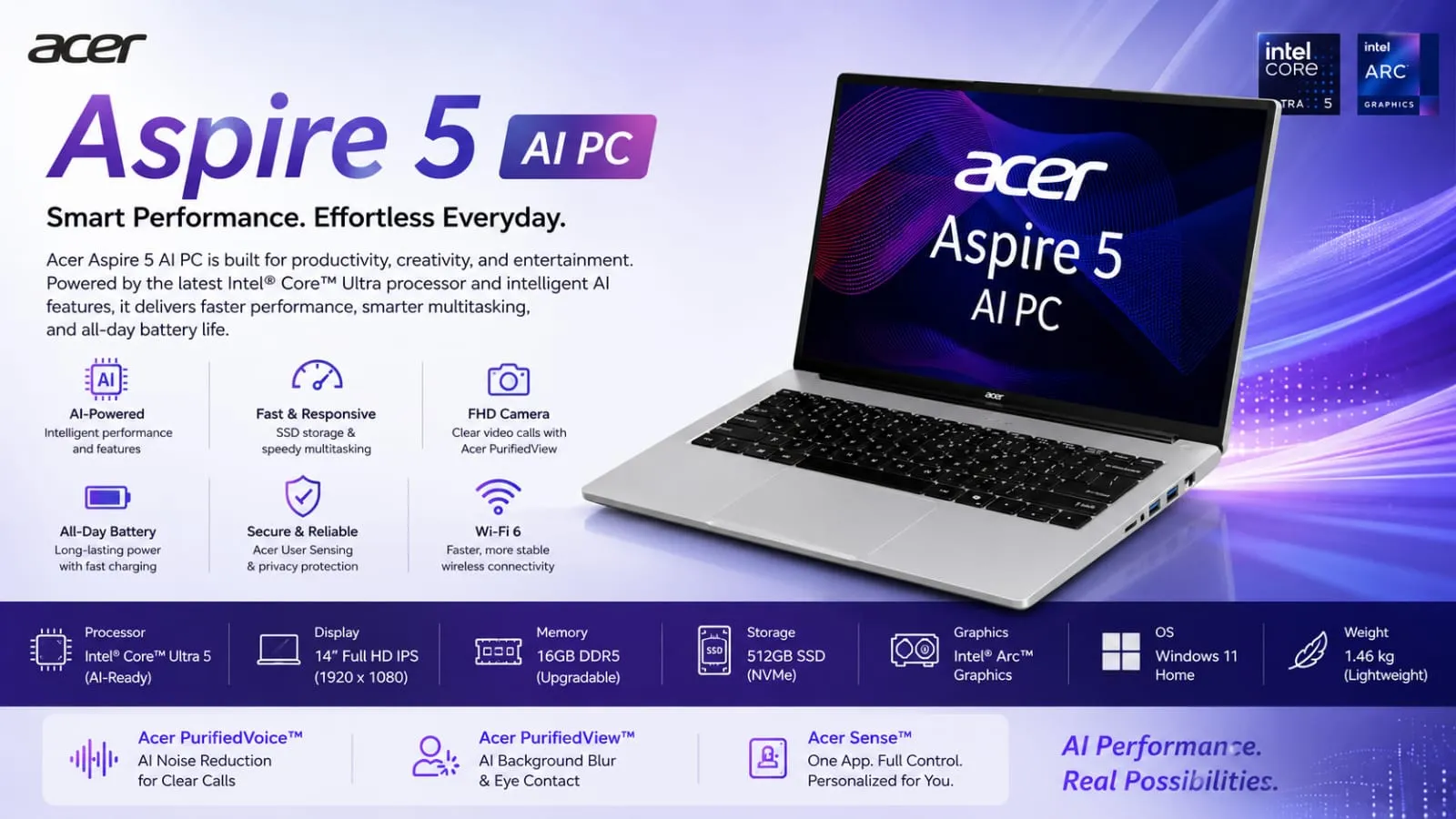
I think, friend, if you are looking for a laptop that can handle daily tasks, studies, some gaming, and coding without spending a lot of money, then you can take a look at the Acer Aspire 5 AI 2026 model. I have used it for a few weeks, and now I will give you a full review of this laptop, no hype, just facts.
The Acer Aspire 5 AI price in India starts at ₹79,999, making it one of the best and strongest laptops in the sub-₹1 lakh budget segment. Do you think it’s just a budget laptop or does it offer some great performance too? Let’s take a closer look at the gaming test – especially on games like GTA 5, BGMI, and Valorant.
In This Article
ToggleAcer Aspire 5 AI Key Highlights (Quick Look)
Display: 14-inch WUXGA (1920×1200) IPS, 16:10 ratio – more vertical space for documents and browsing.
Processor: Intel Core Ultra 5 or Ultra 7 H-series (AI capable).
RAM & Storage: Up to 32GB LPDDR5 + 1TB NVMe SSD.
Weight: Just 1.2 kg and 17.5mm thin – very portable.
Battery: 54Wh, for 4-5 hours of productivity in real use.
Ports: Full USB-C with charging + display output, USB-A, HDMI, SD card reader.
Extras: Backlit keyboard, FHD webcam with privacy shutter, decent speakers.
The best part about the Acer Aspire 5 AI is that it balances portability and performance together. Many laptops in this budget either focus only on power or only on battery life, but this one tries to offer an all-around experience for students, office users, and casual gamers alike.
Now let’s talk about the real review.
Acer Aspire 5 AI Launch and Availability in India
Acer launched the new Aspire 5 AI series in early 2026, targeting students, professionals, and everyday users who want a good mix of performance and portability. The company focused on bringing AI-ready features without making the laptop too expensive. You can find it easily through Acer Exclusive Stores, the official Acer e-store, Amazon, Croma, Reliance Digital, and Vijay Sales.
Acer Aspire 5 AI Price in India 2026 – Is It Worth the Money?
The Acer Aspire 5 AI price in India starts from Rs 79,999 for the base variant with Intel Core Ultra 5. Higher configurations with Ultra 7 processor, more RAM, or extra storage can go up to around Rs 95,000, depending on offers. This pricing makes it competitive against similar 14-inch laptops from other brands.
If you are hunting for an Acer Aspire 5 AI laptop under 50000, you might need to look at older stock or sale periods, but the 2026 AI model offers better features that justify the starting price. During festive sales, discounts of 5,000 to 10,000 rupees are common, bringing it closer to a sweet spot for many buyers.
Display Quality, Design, and Build Quality – Lightweight Champion

The Acer Aspire 5 AI display quality is good for its price. The 1920×1200 resolution and 16:10 aspect ratio offer extra vertical space – fewer black bars when watching Netflix, and more code lines when coding. It’s an IPS panel, so colors are vibrant and viewing angles are solid.
Brightness is average, struggling a bit outdoors in direct sunlight, but perfect for indoor use. I edited long documents on it, and my eyes didn’t tire too quickly. If you do casual video editing or photo work, it’ll do. Not suitable for professional, color-accurate work, but top-class for general use and studies.
Watching YouTube videos and Netflix content feels enjoyable because the screen has decent color reproduction and sharpness. The taller 16:10 aspect ratio especially helps students and office users who spend hours reading PDFs, browsing websites, or working on spreadsheets and coding applications daily.
Design, and Build Quality
When I first picked up the Acer Aspire 5 AI laptop, the first thing that impressed me was its weight. 1.2 kg with a 14-inch screen? Perfect for many students and working professionals. It can be carried in a college bag, and it doesn’t put a strain on the shoulder.
The build quality is solid – the body is plastic but feels premium. There’s a 180-degree hinge, which is helpful for sharing content while laying it flat on a table. The keyboard is backlit, making typing comfortable even at night. The touchpad supports multi-gesture and is responsive.
In my experience, for people who commute daily, Acer Aspire 5 AI best laptop for students in India. Even in the heat outside, it doesn’t heat up as much as some heavy gaming laptops do.
Another thing I noticed during daily use was how comfortable the laptop feels while typing for long hours. The keyboard spacing is good, and the palm rest area stays cool even during multitasking. The slim bezels also make the laptop look more modern and premium compared to older Aspire models.
Performance – Intel Core Ultra Power

This one isn’t available on the Acer Aspire 5 AI Ryzen Version, but rather on the Intel Core Ultra 5 and Ultra 7 H-series. The H-series is performance-focused. Multitasking is very smooth – I was able to juggle 20+ Chrome tabs, MS Office, a Zoom call, and background music without any lag.
Up to 32GB of LPDDR5 RAM and a fast NVMe SSD make app launches instant. File transfers and boot times are also impressive.
Acer Aspire 5 AI for coding and programming – Python, Java, VS Code, and Android Studio all run well. I worked on a small project, and the compilation time was reasonable. For students, the Acer Aspire 5 AI is definitely a reliable laptop choice.
The Intel version offers slightly better AI features compared to older Ryzen variants. It’s a beast for daily productivity and light creative work.
In real-world use, the laptop handles heavy browser usage surprisingly well. Even after opening multiple software tools together, fan noise remained controlled most of the time. The SSD speed also improves the overall experience because apps open quickly and Windows feels smooth without random lag issues.
Gaming Test – How much can I play?

Now comes the fun part – the Acer Aspire 5 AI gaming performance. This is not a dedicated gaming laptop, but how does it handle casual games? I tested it myself. Thermal management during gaming is actually decent for a slim productivity laptop. The keyboard area does not become extremely hot, which makes longer gaming sessions more comfortable. Of course, graphics settings need to stay low or medium, but for casual gamers, the experience remains enjoyable enough.
GTA 5 Performance:
Got 35-50 FPS at 1080p resolution on Low to Medium settings. Smooth for Story mode gameplay, though heavy action moments may show minor frame drops. This is what you can expect with integrated graphics. If you get the variant with a dedicated GPU (available in some models), it will be better. Overall, it is good for time-pass, but don’t expect high graphics. I also noticed that reducing shadow quality and advanced graphics settings improved frame stability a lot. Driving around the city felt smooth most of the time, and loading times were acceptable thanks to the NVMe SSD. For an integrated graphics laptop, GTA 5 performance is respectable overall.
BGMI (Battlegrounds Mobile India):
Runs smoothly on medium settings. 40-60 FPS easily, drops rarely. Battery drains a bit quickly while gaming, but heat control is good. Fine for casual players. Touch controls using an emulator felt responsive during gameplay. I tested several matches continuously, and the laptop maintained stable temperatures without major throttling. Casual BGMI players who mainly play for entertainment rather than esports-level competition will find the gaming experience quite satisfying on this machine.
Valorant Test:
This game performed the best. On low settings, I achieved 70-100+ FPS comfortably. Students who play competitive matches can enjoy it without much input lag. If you choose a higher Acer Aspire 5 AI Ryzen 7 performance for the gaming variant, results can improve further. Valorant benefits from the fast processor and optimized performance settings of the Acer Aspire 5 AI. Even during intense fights and utility-heavy moments, frame drops were minimal. Pairing the laptop with an external gaming mouse can further improve aiming accuracy and the overall competitive gaming experience significantly.
Conclusion of the gaming section:
This isn’t a performance beast for heavy gaming, but this much gaming on a budget laptop is enough for many people. If serious gaming is your thing, look for a dedicated gaming laptop. Overall, gaming performance depends heavily on expectations. If someone only wants smooth esports gaming and occasional AAA titles at lower settings, the Aspire 5 can manage that comfortably. But users expecting ultra graphics and high-end gaming performance should still consider dedicated gaming-focused laptop alternatives instead.
Battery Life Test 2026
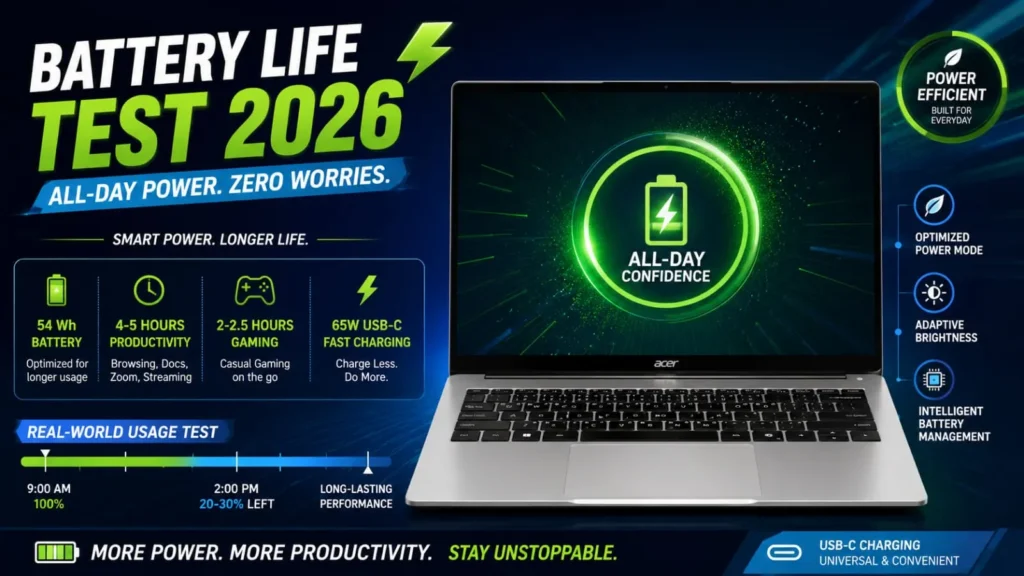
Acer Aspire 5 AI battery backup gives 4-5 hours of real-world productivity tasks (browsing, docs, light video). Charges quickly with a 65W USB-C charger. Gaming and heavy loads are reduced to 2-2.5 hours, which is normal for a laptop of this size.
I used it for office work – it ran comfortably from 9 am to 2 pm with 20-30% battery left. Good for travel. Battery optimization settings in Windows help improve backup further. Using battery saver mode, lowering brightness slightly, and avoiding heavy background apps can extend runtime noticeably. The USB-C charging support is also convenient because users can carry one compact charger for phones and laptops together during travel.
Acer Aspire 5 AI Intel Version vs Ryzen Version
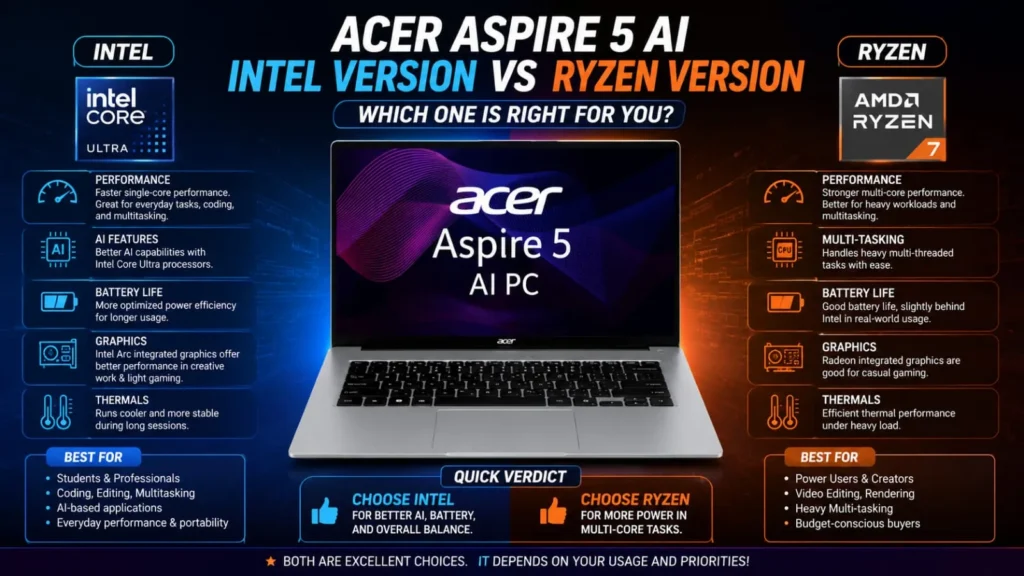
Both variants are available on the market. The Intel Core Ultra series offers better performance and AI features, while the Ryzen versions can be slightly cheaper and are stronger in multi-core tasks. The Acer Aspire 5 AI Intel version appears more balanced in 2026.
If you want an Acer Aspire 5 AI laptop under 50,000, look for older configurations, but you’ll miss out on the latest AI features. The Ryzen versions are still attractive for budget-conscious users because they generally provide strong multi-core performance at a lower price point. However, Intel Core Ultra models feel slightly more future-ready in 2026 due to AI-focused optimizations and improved efficiency during multitasking and productivity workloads.
Who Should Buy Acer Aspire 5AI?
- College students – coding, assignments, light gaming.
- Office goers – multitasking, Zoom calls, portability.
- Casual users – browsing, Netflix, MS Office.
- Light editors – photo/video basic work.
If you want heavy video editing, 3D rendering, or hardcore gaming, then go for a higher series.
Acer Aspire 5 AI gaming and editing performance review. It is a jack of all trades. Everything is good, nothing is outstanding.
Pros & Cons
Pros:
- Super lightweight and portable
- Good display with a 16:10 ratio
- Strong performance for daily + light creative work
- Plenty of ports, no dongle hassle
- Privacy shutter on webcam (very important nowadays)
- Value for money at this price
Cons:
- Battery average under heavy load
- Not for serious gamers (low-medium settings only)
- The brightness could be better for outdoor use.
- Speakers decent but not loud
Final Verdict – Budget King or Average?
Final Verdict – Budget King or Average? The Acer Aspire 5 AI is a genuine and decent all-rounder laptop for 2026. When buying this laptop, you won’t have to completely compromise on budget or features. So, if you’re a practical person and want value in everything you buy, this is a great choice. You won’t be disappointed with this laptop. I definitely recommend this laptop for mid-level and student users.
The best thing about the Acer Aspire 5 AI price in India is that it offers better features than its competitors in this price range, thanks to portability, specifications, and availability.
If you really liked this laptop and have any specific doubts, leave us a comment. And let us know what you’re going to use this laptop for? For more gaming, for studying, or for office work?














FAQ's
What is special about the Acer Aspire 5 AI laptop?
Acer Aspire 5 AI comes with Intel Core Ultra processors, fast LPDDR5 RAM, and AI-ready performance. Daily multitasking, coding, office work, and casual gaming all seem to be handled smoothly.
Is Acer Aspire 5 AI good for students in India?
Yes, Acer Aspire 5 AI is a great student laptop because it is lightweight, portable, and powerful. Coding, assignments, online classes, and light gaming seem to be managed comfortably.
Can Acer Aspire 5 AI handle gaming properly?
Casual gaming experience is quite decent. GTA 5, BGMI, and Valorant run smoothly on medium or low settings without major heating problems.
How much battery backup does Acer Aspire 5 AI offer?
Real-world usage mein around 4-5 hours battery backup is available for browsing, office tasks, and video watching. The battery drains a little quickly while gaming.
Is Acer Aspire 5 AI good for coding and programming?
Yes, Acer Aspire 5 is a reliable laptop for AI coding. VS Code, Python, Java, and Android Studio work smoothly with fast SSD performance.
Does Acer Aspire 5 AI have a good display quality?
The 14-inch WUXGA IPS display looks sharp and colorful. Coding, reading PDFs, and multitasking experience feel better due to the 16:10 aspect ratio.
Which is better: Acer Aspire 5 Intel or Ryzen version?
The Intel Core Ultra version offers better AI features and balanced performance, while the Ryzen version is slightly more affordable and provides strong performance in multi-core tasks.
Is the Acer Aspire 5 AI worth buying in 2026?
If you want an all-rounder laptop within your budget, the Acer Aspire 5 AI is definitely worth buying. The balance of performance, portability, and features seems quite impressive.
Can the Acer Aspire 5 AI be used for video editing?
Basic photo editing and light video editing go smoothly. But for professional 4K editing or heavy rendering, a higher-performance laptop would be better.
Does the Acer Aspire 5 AI overheat during heavy use?
The heating issue isn’t noticeable during normal multitasking and casual gaming. Cooling management is decent, especially compared to bulky gaming laptops in this price range.
How much RAM and storage does Acer Aspire 5 AI support?
Acer Aspire 5 AI comes with up to 32GB LPDDR5 RAM and 1TB NVMe SSD. Apps open fast, and the multitasking experience feels smooth.
Is Acer Aspire 5 AI good for office work and multitasking?
Yes, this laptop is a very practical option for office users. Zoom calls, Chrome tabs, MS Office, and background apps run smoothly simultaneously.

Deepak Kumar is the founder and author of Techallrounder.com. He covers the latest technology news, smartphone and laptop reviews, gadget comparisons, buying guides, and tech tips. His goal is to provide accurate, easy-to-understand, and up-to-date information that helps readers make better technology decisions.