Tech all rounder

Samsung or Apple? One UI 9 vs iOS 27 Full Comparison Guide 
One UI 9 vs iOS 27: Amazing Features Compared

Hey friend, if this year you’re stuck between Samsung vs Apple phones, you’re not alone. Everyone I know is asking the same thing, One UI 9 vs iOS 27, which one should I get? I get it, this decision isn’t easy because both companies have given some solid updates this time.    In my experience, choosing between the two mostly depends on how you use your phone daily and for what purpose, not just which one looks cooler on paper and then buying it for that reason. So let’s break down One UI 9 vs iOS 27 in an easy way, no technical jargon, just simple stuff like I’m telling a friend over morning tea.  Highlight key One UI 9 has new designs, more intuitive multitasking, and smarter AI features than before.  iOS 27 focuses on deeper AI integration, smoother animations, and privacy upgrades  Both systems now offer longer software support, up to 6-7 years  Battery optimization has improved on both sides  Customization is still Samsung’s biggest strength  What’s New in Samsung’s One UI 9? Samsung has actually listened to user feedback this time. One UI 9 feels lighter and faster compared to older versions. The notification panel is cleaner, and Samsung has trimmed down a lot of the bloatware that used to slow things down.  Tell me the truth, have you ever felt your Samsung phone becoming laggy after a year of use? That has been a real problem for many of us. Looking at the features of One UI 9, Samsung claims that it offers better RAM management and smooth animations, and to be honest, I tested it on my cousin’s (maternal uncle’s son) Galaxy phone, and Samsung was actually right about it.  The AI features are also stronger now. Samsung has added smarter photo editing tools, better voice assistant responses, and quicker app suggestions based on your habits.  One UI 9 Design and Customization If you love changing your phone’s look every few weeks, Samsung still wins here. You get more lock screen options, better widget control, and deeper theme customization. Apple users often ask me why they can’t do this on iPhone, and honestly, that’s just Apple’s style, they like to keep things simple and controlled.  Also Read : Premium iOS 27 Public Beta Benefits You’ll Love What Does Apple’s iOS 27 Bring to the Table? Now let’s talk about Apple’s side. iOS 27 features focus heavily on AI, privacy, and a smoother overall experience. Apple has improved its on-device AI processing, which means many features now work without needing internet, and that is a big win for privacy lovers.  If you think like I do, privacy really matters in 2026. With so many apps tracking everything, Apple’s approach of keeping data on your device instead of sending it to servers is genuinely reassuring.  Animations feel smoother and more fluid than before, and the speed of switching between apps and loading them has also improved. Battery life has gotten a small but noticeable boost too.  iOS 27 User Experience Apple keeps things simple, and that is both good and bad. Good because anyone can pick up an iPhone and use it without confusion. Bad because if you like deep customization, you will feel a bit boxed in.  One UI 9 vs iOS 27: Which One Wins in Performance? One UI 9 vs iOS 27: Which One Wins in Performance Today? This is where it gets interesting. In my experience, One UI 9 vs iOS 27 performance comes down to how the software is optimized with hardware. Samsung’s newer chips paired with One UI 9 handle heavy gaming and multitasking really well now.  Apple, on the other hand, has always had an edge in optimization because they control both hardware and software tightly. So apps open faster, and the whole system feels more consistent.  Honestly buddy, if raw performance and gaming matter most to you, Samsung’s flagship phones with One UI 9 are catching up fast. But if you want consistency and long-term smoothness, iOS 27 still holds a slight edge.  Battery Life and AI Features Comparison This year, both brands are focusing entirely on improving AI-based experiences. Samsung’s AI tools help more with photo editing, translation, and quick replies. Apple’s AI works quietly in the background, focusing on privacy and system efficiency.  For battery life, it really depends on usage. Heavy gamers might notice Samsung phones drain a bit faster under load, while iPhones tend to sip battery more efficiently during normal use.  Should You Choose Samsung One UI 9 or Apple iOS 27 in 2026? Now here is the real question everyone wants answered. If you like customizing everything and want more freedom with your phone, go with Samsung One UI 9 vs iOS 27 comparison clearly favors Samsung for flexibility.  But if you prefer simplicity, strong privacy, and a smooth ecosystem across your devices like iPad and Mac, Apple’s iOS 27 makes more sense.  My Honest Verdict Rating: 4.3 out of 5 for both, honestly it is a tie depending on your needs.  Pros of One UI 9? Better customization, smooth performance, and a great experience on a budget  Cons of One UI 9: occasional bloatware, inconsistent updates on budget phones  Pros of iOS 27: smooth performance, strong privacy, long software support  Cons of iOS 27: less customization, higher price range  Tell me the truth, are you Team Samsung or Team Apple? Both are great in their own way, so pick whichever matches how you use your phone daily.  Also Read : Premium iOS 27 Public Beta Benefits You’ll Love Disclaimer This article is based on publicly available information and general software trends. Features and performance may vary depending on device model, region, and future updates from Samsung and Apple. Please make sure to check official sources before making a purchase decision.  Related Post Samsung or Apple? One UI 9 vs iOS 27 Full Comparison Guide  10 Best Camera Phones Under ₹20,000 in 2026 Samsung Galaxy F70 Pro May Launch Soon with Snapdragon 6 Gen 3 Oppo Reno 16 Series Could Be the Best Reno Yet iQOO Neo 11S Leak Reveals Expected Price, Storage Options & August Debut 1 … Read more
Snapdragon 8 Elite Gen 6 Launch in September: What to Expect

Powerful Snapdragon 8 Elite Gen 6 officially revealed with next-gen flagship performance.

Friends, if you are a phone enthusiast like me, then you must be waiting for the big chip news every year. That wait is almost over. Qualcomm is about to launch the Snapdragon 8 Elite Gen 6, and there’s already a lot of buzz around it. I remember when last year the Snapdragon 8 Elite Gen 5 came out, I stayed glued to my phone reading every leak very carefully. This year’s wait feels even bigger for me, and I want to tell you everything that has come out so far about the Snapdragon 8 Elite Gen 6. Honestly, don’t you also check chipset news before buying a new phone? If yes, then this article is for unique people like you. Highlight key Qualcomm will unveil the Snapdragon 8 Elite Gen 6 at the Snapdragon Summit 2026, from September 22 to 24, in Maui, Hawaii. Two chips are expected this year: the standard Snapdragon 8 Elite Gen 6 and a more powerful Snapdragon 8 Elite Gen 6 Pro. Both chips will likely use TSMC’s new 2nm process, which means better speed and power savings. The Pro version may support LPDDR6 RAM, while the standard version may stick with LPDDR5X. Xiaomi 18 series and Samsung Galaxy S27 series are tipped to be among the first phones with this chip. Prices of phones with this chip may go up a bit this year. When Will Qualcomm Launch the Snapdragon 8 Elite Gen 6? Now let’s talk about the date, because I know that’s what most of you want to know first. Qualcomm has officially confirmed that the Snapdragon Summit 2026 will run from September 22 to September 24. This event will happen in Maui, Hawaii, just like the last few years. This is the same place and same style of event where Qualcomm showed off the Snapdragon 8 Elite Gen 5 last year. In my experience, Qualcomm almost never misses this September window. They have kept this pattern for many years now, and it works well for them because it lands just weeks after Apple’s iPhone launch. This way, Qualcomm gets to show that Android flagship phones with the Snapdragon 8 Elite Gen 6 can also compete with Apple’s newest chip. So mark your calendar, buddy. September 22, 2026 is the day when it is likely that the Snapdragon 8 Elite Gen 6 chipset will be presented to the world for the first time. Two Chips Instead of One: Gen 6 and Gen 6 Pro Here is something new and interesting. This year, Qualcomm may not launch just one flagship chip. Reports say the company is working on two versions: the standard Snapdragon 8 Elite Gen 6 and a stronger Snapdragon 8 Elite Gen 6 Pro. This is a big change from before. Earlier, Qualcomm used to launch one main flagship chip, and phone makers would just use that same chip in different phones. Now, it looks like Qualcomm wants to give brands more choice. The Pro chip will likely go into phones like the Samsung Galaxy S27 series, while the standard chip may power other flagship and near-flagship phones. However, this also means shopping will get a little more confusing for regular buyers. You will need to check carefully which version of the Snapdragon 8 Elite Gen 6 your phone actually has, because the performance gap between the two may not be small. Also Read : Snapdragon 7 Gen 4 vs 7s Gen 4: Big Difference Explained! Snapdragon 8 Elite Gen 6: Potential Information Revealed So Far Let’s get into the good part now: the specifications. Based on leaks so far, here is what the Snapdragon 8 Elite Gen 6 processor may offer. Built on TSMC’s 2nm Process Both chips are expected to use TSMC’s new 2nm manufacturing process. This is a jump from the older node used in the Gen 5 chip. In simple words, a smaller process node means the chip can pack more power while using less battery. So you can expect the Snapdragon 8 Elite Gen 6 to give better battery life along with strong performance, at least on paper. CPU Layout and Speed Leaks suggest the standard Snapdragon 8 Elite Gen 6 chipset may use a new core layout, different from a simple 2+6 setup used in earlier chips. This new layout may focus more on saving power while still being fast. Clock speed reports vary, but the standard chip may reach up to around 4.4GHz, while the Pro version might push close to 5GHz. If that turns out to be true, the Gen 6 Pro could be one of the fastest smartphone chips ever made. GPU and Gaming Performance For gamers, the GPU part matters the most. The Snapdragon 8 Elite Gen 6 is expected to come with an Adreno 845 GPU, while the Pro chip may get an even bigger Adreno 850 GPU with more graphics memory. This should mean smoother gaming, better ray tracing, and less heating during long gaming sessions. If you play heavy games like me, this upgrade should feel noticeable. RAM and Storage Support Now this part is interesting. The Pro version may support the newer LPDDR6 RAM along with UFS 5.0 storage, while the standard chip may stick to LPDDR5X. This means Pro phones could load apps faster and handle multitasking better than standard chip phones. AI Features Just like every year, Qualcomm will also talk a lot about AI. The Snapdragon 8 Elite Gen 6 is expected to bring stronger on-device AI features. This could mean smarter photo editing, faster translation, and better voice assistant performance, all without needing the internet all the time. I feel this is the part Qualcomm will focus on the most during their keynote, since AI is the biggest trend in the phone industry right now. Snapdragon 8 Elite Gen 6 vs Snapdragon 8 Elite Gen 5: What’s Changing If you already own a phone with the Snapdragon 8 Elite Gen 5, you might be wondering if the upgrade is worth it. Here … Read more

Samsung One UI 9: July Release Date, Features & Eligible Devices

Smart Samsung One UI 9 Upgrades You Can't Miss Today

If you or someone in your family has a Samsung phone, dude, you’ve probably already heard about this. Samsung One UI 9 is almost here, and it’s bringing one of the biggest software updates for Galaxy users. I remember waiting for One UI 8 last year, refreshing the settings page every day like it would make things happen faster. Well, it never did, but yeah, the excitement was real. In this article, I’m going to tell you everything about Samsung One UI 9, from the release date to features and which phones will get it first and when it will reach you. No confusing tech stuff, just simple and honest info you’ll get in this article. Highlight key Samsung One UI 9 launches officially on July 22, 2026 Built on Android 17 First arrives on the new Galaxy Z Fold8 and Z Flip8. Beta program has been running since May 13, 2026, on the Galaxy S26 series. Brings Gemini Intelligence and other AI tools Older phones will get it gradually through the rest of 2026 What Exactly Is Samsung One UI 9? One UI 9 interface running on a Galaxy smartphone with Android 17 features Samsung One UI 9 is the newest version of Samsung’s software skin that sits on top of Android. Think of it like a fresh coat of paint plus some new tools added to your house. It is based on Android 17, and it focuses more on smoother performance, better AI features, and small but useful design changes rather than a complete visual overhaul. Samsung already gave the Quick Panel a big redesign in One UI 8.5, so this time around, One UI 9 is more about polishing things and adding smarter AI tools underneath. Samsung One UI 9 Release Date: When Is It Really Coming Here is the part everyone wants to know, buddy. The official One UI 9 update goes live on July 22, 2026, alongside the Galaxy Unpacked event happening in London. This is when Samsung will show off the “full experience” of the update, including the AI features it has been teasing since May. The catch is that the very first phones to run stable One UI 9 will be the brand new Galaxy Z Fold8 and Z Flip8, expected to go on sale in the first week of August. If you already own a Galaxy phone, you will not get the update on July 22 itself. For the Galaxy S26 series, which has been testing beta builds since May 13, the stable rollout is expected around September 2026. Tell me the truth: waiting two extra months feels long, but Samsung usually uses this time to fix bugs so your daily phone does not get messed up. Older flagships and mid-range A-series phones should start receiving One UI 9 gradually from September right through to December 2026, depending on your region and carrier. Also Read : HarmonyOS 7: Release Date, Features & What’s New (2026) One UI 9 Eligible Devices List Samsung has not published one single official list yet, but based on confirmed beta testing and firmware leaks, here is roughly who is getting Samsung One UI 9.  Galaxy S series: S26, S25 (including FE), S24, and S23 series Galaxy Z series: Z Fold8, Z Flip8, Z Fold7, Z Flip7, Z Fold6, Z Flip6, Z Fold5, Z Flip5 Galaxy A series: A57, A56, A55, A54, A37, A36, A35, A34, A25, A24, A17, A16, A15, and A07 Galaxy M series: M34 and other recent M-series models Galaxy Tab: Tab S9 series and newer Tab A9 models In my experience, if your phone is from 2023 or later, chances are high it will get One UI 9. Older phones like the S22 series or the Z Fold4 are already on security-only updates, so sadly they are out of the picture. What’s New in Samsung One UI 9 Features One UI 9 new AI features, Gemini Intelligence, Quick Panel, and security improvements This is where things get exciting. One UI 9 brings a genuine push toward smarter AI on your phone. Gemini Intelligence, Google’s newer AI agent, can complete small multi-step tasks on your behalf, though it will mostly work on flagship chips. A refreshed Quick Panel with separate sliders for brightness, sound, and media Combined TalkBack accessibility tool that merges Samsung and Google’s screen readers into one A new Text Spotlight feature that pops selected text into a floating window, great for reading small fonts High-risk app detection that warns and blocks suspicious apps before they run Samsung Notes gets decorative tapes and more pen styles. Contacts app now connects directly to Creative Studio for custom profile cards. A long-requested network speed indicator finally lands in the status bar. If you think as I do, the accessibility and security additions are honestly more useful day-to-day than flashy AI demos. Should You Wait For The Update? If you are not buying a new foldable, there is no rush. One UI 9 will still have some bugs in its early builds, since that is normal for any big software update. I would say wait for at least the second or third stability patch before installing it, especially if your phone is your only daily driver. However, if you already joined the Samsung Members beta program, you are ahead of the curve and can enjoy early access right now. Final Thoughts I feel that Samsung One UI 9 is more of a solid, AI-focused update rather than a completely new design. It kicks off with the launch of the Z Fold8 and Z Flip8 on July 22, and the rest of us might have to wait for our turn sometime between September and December 2026. Now, we just wait and see how smooth the rollout really is or if it’s just a normal update. Disclaimer: This article is based on beta builds, leaks, and official Samsung statements available at the time. Release dates and features might change before the final stable release. For the most accurate updates, … Read more

HarmonyOS 7: Release Date, Features & What’s New (2026)

Amazing HarmonyOS 7 Features You Can't Ignore

Friends, if I’m right, you also have a Huawei phone and are into new tech, then I’m sure you’re also eagerly waiting for HarmonyOS 7. I remember when I updated my old Huawei tablet to the new HarmonyOS build, and honestly, the speed change blew me away. That’s why when Huawei showcased HarmonyOS 7 at their big developer event, I got excited again this time. In this article, I’ll explain everything about HarmonyOS 7 in simple words—no complicated technical stuff, just straight and true info for you. Highlight key HarmonyOS 7 was announced on June 12, 2026, at the Huawei Developer Conference (HDC 2026) Brings a new 3D “spatial” look with glass-like effects. Comes with stronger Agentic AI powered by the Celia assistant Claims up to 15% better performance than HarmonyOS 6.1 Developer beta is live now, stable version coming this fall. Mate 90 series will be the first phone with it pre-installed What Is HarmonyOS 7 and How Does It Work? What Is HarmonyOS 7 HarmonyOS 7 is Huawei’s newest operating system update, and it’s built for phones, tablets, laptops, smartwatches, and even smart home gadgets. Tell me the truth, most of us just want an OS that feels fast and doesn’t crash, right? Well, Huawei says this version is not just a small update. It is built from the ground up around AI, which means the whole system understands what you want to do and acts on it, instead of you tapping through five apps. In my experience, older HarmonyOS versions were already smooth for daily use. But HarmonyOS 7 goes a step further by making the AI assistant, called Celia, work like a real helper. It can now search for info, manage your reminders, and even complete tasks across different apps with just one voice command or text. HarmonyOS 7 Release Date and Availability Huawei showed HarmonyOS 7 to the world on June 12, 2026. The developer beta started rolling out the same day, but only for a small group of Huawei flagship devices in China. If you’re wondering when normal users like us will get it, the answer is simple: the full, stable version is expected sometime this fall, likely between September and November 2026. The Huawei Mate 90 series, launching around September, will be the first phone that comes with HarmonyOS 7 already installed out of the box. Other devices will get the update later through the usual software rollout, so patience is the key here. Also Read : One UI 8.5: A Revolutionary Update with Painful Compromises HarmonyOS 7 Features and Improvements Now let’s talk about the real features that make HarmonyOS 7 special. Friends, this update touches almost every part of the system. HarmonyOS 7 Features and Improvements New Spatial Design and UI The biggest visual change in HarmonyOS 7 is the new 3D spatial effect. Your lock screen wallpaper now reacts and shows depth, almost like it’s popping out of the screen. Buttons, sliders, and menus also get a soft glass-like glow. If you have seen Apple’s newer “Liquid Glass” look, this feels a bit similar, but Huawei has given it its own style. HarmonyOS 7 AI Features Explained This is where HarmonyOS 7 truly shines. The Celia AI assistant is now much smarter thanks to something called the Intelligent Agent Framework 2.0. In simple words, it means the AI can complete more than 90% of the tasks you give it, without you doing extra steps. You can ask it to write text, pull up real-time info, or manage in-app actions, and it just does the job. HarmonyOS 7 Performance Huawei claims OS 7 is about 15% faster than the earlier HarmonyOS 6.1. Apps open quicker, multitasking feels smoother, and there is less lag while switching between windows. If you think as I do, real-world speed matters more than lab numbers, so we will only know the true difference once regular users start using the stable build. HarmonyOS 7 Security Features Security is another strong point here. HarmonyOS introduces a new anti-fraud platform built right into the system. This helps protect users from common online scams, which is honestly a great addition given how many phone scams happen these days. Privacy controls also got tighter, giving users more say over what apps can access. HarmonyOS 7 Ecosystem and Connectivity One thing HarmonyOS has always been good at is connecting devices together. HarmonyOS 7 pushes this further, letting your phone, tablet, laptop, and wearables share tasks and data more smoothly. For example, you can start writing something on your phone and finish it on your tablet without any extra setup. HarmonyOS 7 Supported Devices List As of now, only a handful of devices are part of the early developer beta: Huawei Mate 80 Pro Huawei Mate X7 Huawei Mate XT Master Huawei Pura 90 Pro Max Huawei Pura X Huawei Pura X Collector’s Edition Huawei nova 15 Pro More models will join the beta program in the coming months. Once the stable version launches this fall, the list of HarmonyOS 7 compatible smartphones and tablets should grow a lot bigger, covering most recent Huawei devices. HarmonyOS 7 vs Android Comparison Many people ask me if HarmonyOS 7 can beat Android. Honestly, both have their strong points. Android still has way more apps and global support. But HarmonyOS 7 focuses heavily on device connectivity and AI-driven automation, something Android is still catching up on in certain areas. If you’re deep into the Huawei ecosystem, HarmonyOS 7 will feel more connected and personal. Also Read : Oppo ColorOS 16.1: Impressive Yet Not Revolutionary HarmonyOS 7 vs HarmonyOS Next HarmonyOS Next was the earlier big shift where Huawei dropped Android app compatibility completely. HarmonyOS 7 builds on that same independent base but adds the new spatial design and stronger AI layer on top. So basically, HarmonyOS 7 is the next step forward, not a separate branch. How to Update to HarmonyOS 7 Right now, only approved developers in China can join the beta. For the rest of … Read more

One UI 8.5: A Revolutionary Update with Painful Compromises

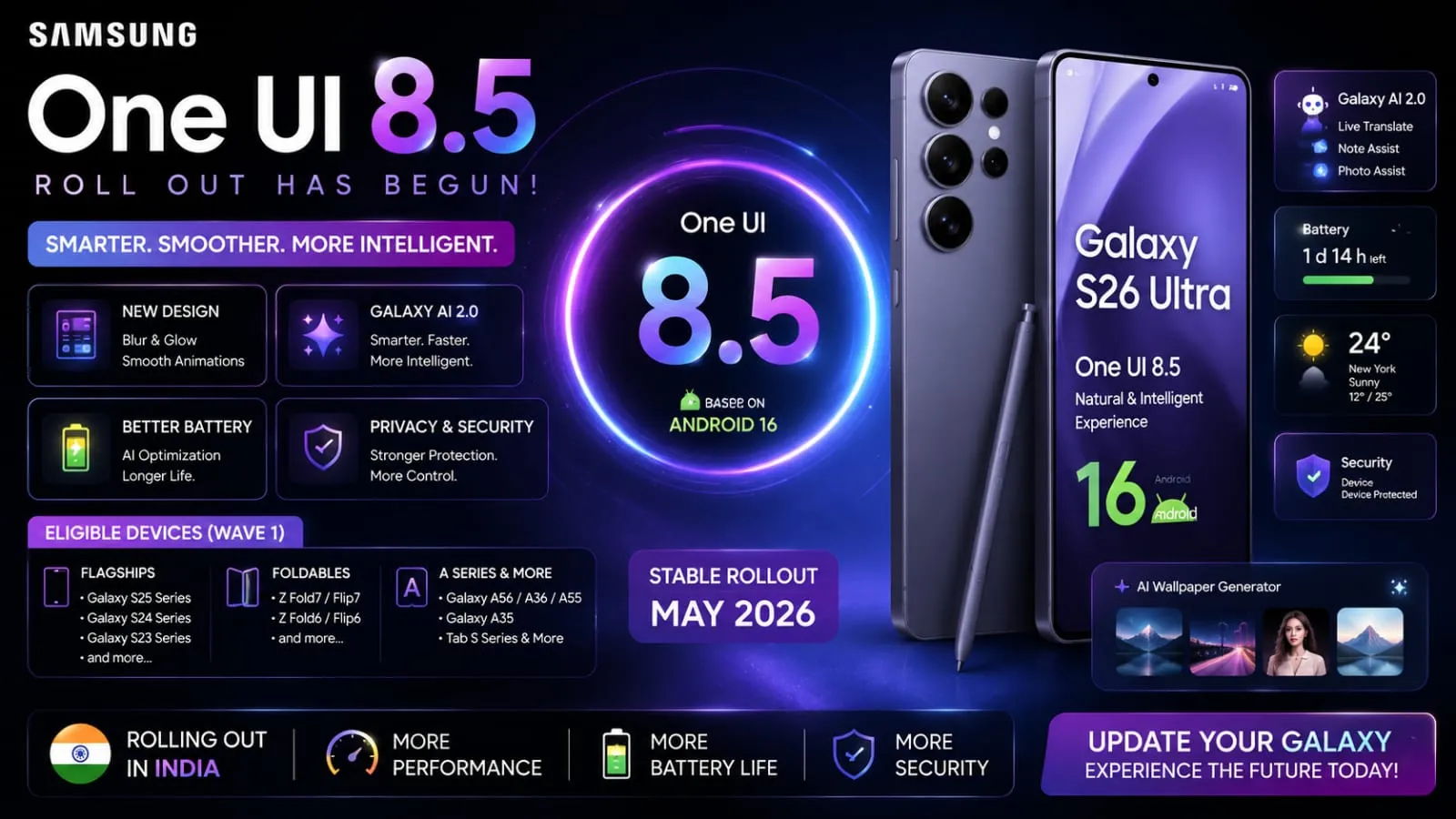
One UI 8.5 premium update feature image

Hey guys, the One UI 8.5 rollout has finally begun, and everyone is buzzing in their groups! Some are asking when the Samsung One UI 8.5 update will arrive, some are even more worried about the One UI 8.5 release date, and people in India want it first. I’m excited myself because my Galaxy device is still running great, but once the update arrives, battery life and smoothness will be at a whole new level. In this complete guide, we’ll break it all down: One UI 8.5 features, eligible devices, supported phones, the Samsung Android 16 update, the One UI 8.5 beta program, the One UI 8.5 update in India, the changelog, and the installation guide. It’s all in detail, no nonsense, just straight up about the pros and cons. What is One UI 8.5? Before & After One UI 8.5 is Samsung’s latest custom skin that runs on Android 16. Samsung has focused on battery optimization, user interface performance, and AI intelligence in this update. It seems that 8.5 feels smoother, cleaner, and more intelligent than the previous One UI 8.0. Samsung says that the main objective of this update is to focus on a “Natural & Intelligent Experience.” One UI 8.5 Release Date – So What’s the Situation Now? The stable One UI 8.5 rollout has officially begun in May 2026. In South Korea, the Galaxy S25 series began receiving it in early May, and it’s rolling out to global markets (including India) from mid-May. Previously, it came pre-installed with the S26 series, but now older flagships are getting it. If you’re using a Samsung Galaxy S25, S24, Z Fold/Flip series, or A-series phone, One UI 8.5 could completely transform your phone experience. According to the Samsung One UI roadmap 2026, it is coming in waves: Wave 1 (May early): S25 series, latest foldables Wave 2: S24 series or Z Fold6/Flip6 Wave 3: S23 series or select A series You can expect this update to arrive in India soon, especially for flagship users. Samsung typically starts each update in Korea and then expands to other countries. If your phone is eligible for the update, you should receive a notification very soon. Key Features of One UI 8.5 This is based on Android 16 QPR2, so the features are solid. There are significant improvements in visual polish and AI. New Design and Animations: One UI 8.5 includes a new “Blur & Glow” effect. Icons, notification shade, and quick settings will now appear more glassy and premium. Animations are much smoother. After this update, your device’s home screen, lock screen, and Always On Display will now have new styles. Advanced AI Features:  Galaxy AI 2.0: Improved Circle to Search, Live Translate, Note Assist, and Photo Assist AI Wallpaper Generator: Creates beautiful wallpapers from text descriptions AI Call Translator: Real-time call translation Smart Reply and AI Summarizer: Easily summarize messages and notes with one click. Performance improvements: One UI 8.5 features improved RAM management and CPU optimization. Gaming mode will now be more powerful. This update results in more stable frame rates and lower battery consumption. Battery optimization: Battery life is seeing significant improvements thanks to AI battery optimization. Many phones are easily achieving 1.5 days of battery life. Privacy and Security: The new Privacy Dashboard, Secure Folder, and App Permission Manager have been further strengthened. Also Read :  iPhone 17 Complete Information – Is It Worth Buying? One UI 8.5 Eligible Devices and Supported Phones Samsung has stated that several devices will receive this Samsung Android 16 update with One UI 8.5. Most phones that were eligible for One UI 8 will also receive it. Galaxy phones that will soon receive the One UI 8.5 update: Galaxy S25 series (S25, S25+, S25 Ultra, FE, Edge) Galaxy S24 series Galaxy S23 series Some S22 models (the biggest and final update for some) Foldables: Z Fold7, Flip7, Fold6, Flip6, and select older phones Mid-range and budget: A series like the A56, A36, A55, A35 Some M and F series Tab S series To check if you’re receiving the update, go to Settings > Software Update or open the Samsung Members app. In India, A-series devices may have to wait a little longer, but it will arrive. The full list of One UI 8.5 eligible devices can be found on Samsung’s official source. One UI 8.5 Changelog – Important Changes The changelog includes visual refreshes, improvements to AI features, connectivity fixes, and the latest security patch. Several bugs have been fixed from the beta version to the stable version. One UI 8.5 offers significant performance improvements, especially on older flagship phones. Battery life has also improved. One UI 8.5 Beta Program The beta program has been running since December 2025, and India was included in this program. Now that the stable version is coming, it’s not time to join the beta, but keep checking the Samsung Members app for future updates. Many people have tried the beta and provided feedback that the stable version is much better. Installation Guide – Step by Step (Also for India) Back up your photos, WhatsApp chats, and important files first. Sometimes minor issues occur during updates. Go to Settings > Software Update > Download and Install. Stay connected to Wi-Fi, and keep your battery at least 50%. It will download (about 2-4GB), then restart and install. My tip: Update at night; you’ll get a fresh phone in the morning. In India, the One UI 8.5 update on carrier versions (Jio and Airtel) may take longer than the unlocked version. Keep notifications turned on in the Members app. Performance Improvements and Battery Optimization Beta users and those with early stable versions are saying that animations are smoother than ever, heating is reduced, and One UI 8.5’s battery optimizations are really working. Network Saver handles background data smartly. You can clearly feel the difference between gaming and daily multitasking. Every device is different, but overall, the vibes are positive. Also Read : Samsung Galaxy S26 Ultra 5G: 5000mAh … Read more

Oppo ColorOS 16.1: Impressive Yet Not Revolutionary

Oppo ColorOS 16.1: Impressive Yet Not Revolutionary

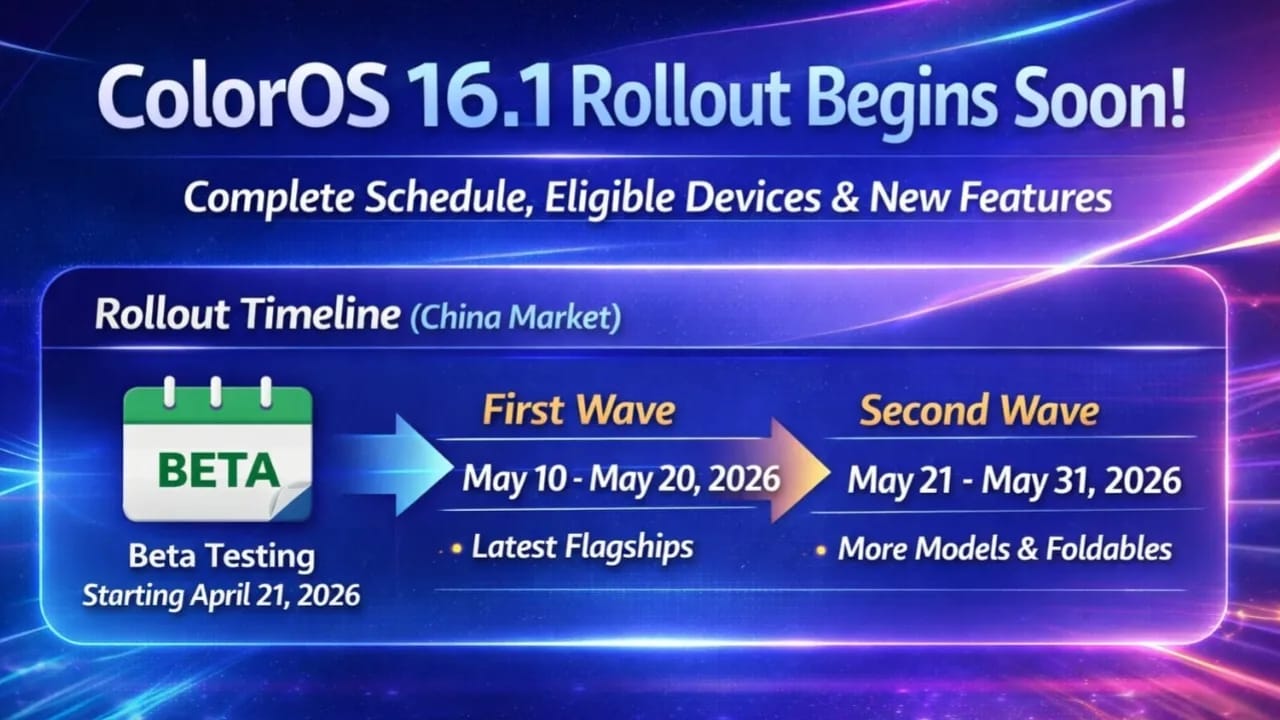
Oppo has announced the official rollout plan for its ColorOS 16.1 update, based on Android 16. This version makes the interface more attractive and responsive while also adding useful smart features that users use every day. Rollout Timeline in China Market – April 2026 Update Beta Testing: The application has been open for early access for a while and will close on April 17, 2026. I expect selected users on top flagships to receive the beta around April 21, 2026.Stable Version: First Wave (May 10 to May 20, 2026): I expect the newest and most premium devices will be covered first in this phase. Second Wave (May 21 to May 31, 2026): A wider rollout will be conducted for additional flagship, foldable, and mid-range models. The schedule mentioned in this article is for the Chinese market, and a global rollout, including India, is expected to occur a few weeks later – if leaks are to be believed, it could begin in late May or early June 2026, depending on your region and device variant. Updates tend to arrive gradually, so even after the official window opens, users need to be patient. Eligible Devices (Confirmed for Stable Rollout) Eligible Devices (Confirmed for Stable Rollout) Oppo and OnePlus have released the update for over 20 smartphones: First Wave (May 10–20): OnePlus Ace 6 Collection and OnePlus Turbo 6 Lineup Oppo’s Find X9, Find X8, and Find X8s smartphone series OnePlus 15 Series, OnePlus 13 Series Oppo Find N6 and Find N5 (Foldable) Oppo Pad 4 Pro OnePlus Tablet 2 Pro Second Wave (May 21–31): Reno 14 Pro Series, Oppo Reno 15 Series Oppo K15 Series, K13 Turbo Pro Oppo Find X7 Series Oppo Pad 5 Additional OnePlus models from previous series (final list subject to change) If your device is the latest flagship or high-end foldable, you have an even better chance of getting it in the first wave. Mid-range and older flagships are expected to arrive in the second wave or later in the global phase. Regularly check your phone’s Settings > About Phone > System Updates for updates. Also Read :  iPhone 17 Complete Information – Is It Worth Buying? What’s new in ColorOS 16.1? What’s new in ColorOS 16.1? ColorOS 16.1 isn’t just a single update—it includes a host of features that improve the lock screen and animations and make everyday use even easier. Smart Lock Screen Island / Live Activities Bar: A new pill-shaped or capsule-like area at the bottom of the lock screen that displays real-time information. It handles playback, flashlight, calls, navigation, music, time, and more in a compact, easily visible way. This design is inspired by the modern Dynamic Island concept but seamlessly integrated into ColorOS. The lock screen media player is now even better with an updated music widget: with the updated music widget, album artwork stands out more, and lyrics can be viewed directly on the lock screen or always-on screen. Smoother Animations and Transitions: The engine upgrade makes every system movement (scrolling, app switching, and interface) visible, further enhancing the user experience. Notification Improvements: Notifications are now displayed neatly on a single screen, reducing unnecessary information. Camera Interface Refresh: The camera UI has been redesigned to make modes and settings quicker and easier to access. AI and Performance Polishing: Additional AI-based features to improve smart interactions, reduce heating during extended use, and provide stable performance. Slightly increased power efficiency during extended use. Many initial impressions show how these lock screen changes make the phone feel more fresh and intelligent, without making things overly complicated. Tips for a Smooth Update Experience (Especially for Indian Users) Ensure your phone has at least 50% battery, is connected to stable Wi-Fi, and has plenty of free storage (around 5–8 GB is recommended). Back up important data before updating. Flagship users (Find X series or OnePlus 13/15) may see this soon. If you have a Reno or K-series device, expect this feature to arrive around the second wave or a little later in the global rollout. Realme smartphones with the same software may receive a parallel Realme UI update, but it may release at different times. ColorOS 16.1 continues Oppo’s move towards a cleaner, more responsive experience with thoughtfully designed smart elements. While the company is already working on future Android versions in the background, this 16.1 update delivers immediate daily improvements. Final Verdict ColorOS 16.1 is coming with a polish-focused update—it might not look like a big deal, but it has the potential to make everyday use feel smoother, smarter, and more modern. For users who prefer a clean UI and improved performance, this could definitely be a useful upgrade. It hasn’t hit the market yet. Once it does, we’ll definitely hear about its features through some means. All the information above is based on leaks. Also Read : Samsung Galaxy S26 Ultra 5G: 5000mAh battery, Snapdragon 8 Elite Gan 5, 200MP Camera. Pros of ColorOS 16.1 & Cons     Pros of ColorOS 16.1 Smoother & Faster Performance – animations, scrolling, app switching more fluidSmart Lock Screen Island – real-time updates for music, calls, timer, navigation Improved Camera UI – cleaner, faster, and premium-looking interface Better Notification Management – stacked notifications for clutter-free view Enhanced Music Lock Screen – album art + lyrics support AI Smart Features – better suggestions and system optimization Refined Premium Design – smoother transitions, transparency, modern UI   Cons of ColorOS 16.1 Minor Upgrade – not a major or revolutionary update Inspired Design – some UI elements look similar to iOS / One UI Possible Bugs – early builds may have glitches or stability issues Slow Rollout – update may arrive late on some devices Device Limitations – some features only on high-end phones Adjustment Time – new UI changes may take time to get used to Latest Post Oppo ColorOS 16.1: Impressive Yet Not Revolutionary ByThe Legend | April 21, 2026 | Read More Snapdragon 7 Gen 4 vs 7s Gen 4: Big Difference Explained! ByThe Legend | … Read more